Your homelab shuts down clean when the power goes, and wakes when it’s back.
nutwake runs on a Raspberry Pi that watches your UPS through NUT. It waits until your nodes are really off before the Pi halts, wakes only the nodes the outage shut down, and records the whole thing on a read-only status page.
v0.1.0 is a pre-release for Linux on arm64, armv7 and x86-64. It has been tested with a fake UPS and fake nodes, and has not run on real hardware yet.
Outage on Wed Nov 18
Power was out for about 1 h 12 min. The nodes shut down at 10:31 am and were woken again by 11:32 am. The Pi was off from 10:35 am to 11:16 am, so nothing was recorded then.
nutwake demo.How a power cut plays out
The times are the ones in the chart above. Every step is something you can see on the status page afterwards. The details are in the guide.
- 10:04 am
Power fails
The UPS reports it and nutwake records the power cut. The record survives a restart of nutwake or of the Pi.
- 10:31 am
The battery runs low
upsmon tells the NUT client on each node to shut it down, and runs
nutwake shutdownon the Pi, which writes down which nodes were up. - 10:35 am
The Pi halts last
nutwake waits until each node stops answering both its own check and a plain ping, then halts the Pi. It halts anyway if the wait runs out.
- 11:16 am
Power comes back
The Pi boots and waits for steady power and a battery at 15%. If the battery never gets there, it wakes the nodes anyway after a time you set.
- 11:27 am
Only the right nodes wake
Wake-on-LAN packets go to the nodes the outage shut down, a few seconds apart, and repeat for any that have not answered. A node you started by hand, or one that never went down, is left alone.
A status page that only reads
It shows the UPS and the nodes right now, and a chart for the last power cut, the last 24 hours or the last 7 days. Where the Pi was off, the chart is hatched, because nothing was recording.
It answers GET and HEAD, stores nothing it is sent, and loads nothing from outside the Pi. Every chart has a table version for screen readers, and the page has a layout for narrow screens. Read how it works.
Try it without a UPS:
nutwake demo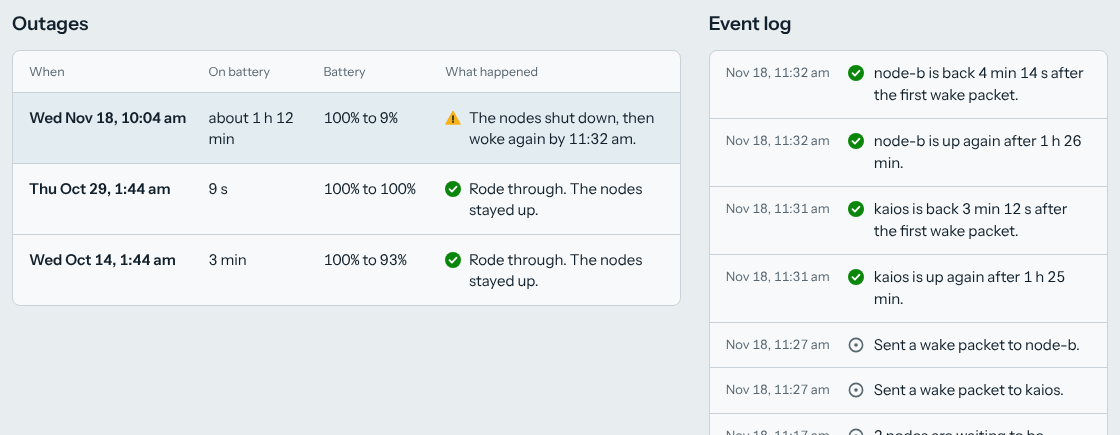
Install it on a Pi
You need a Pi, or any Linux machine, that can reach the UPS through NUT, and nodes on the same network segment as the Pi, because the wake packet is a broadcast. Wake-on-LAN has to be switched on in each node’s BIOS and network card.
v0.1.0 has been tested with a fake UPS and fake nodes, through a whole power cut from the first loss of mains to the wake packets. It has not run against a real UPS and real nodes. The systemd unit, ping with its capability, and Wake-on-LAN on real network cards are the parts those tests cannot cover. Run nutwake check, then pull the plug once before you trust it.
Each release has the three binaries and a SHA256SUMS file to check them against.
- 1
Install the binary
Download the one for your Pi:
nutwake-linux-arm64for a 64-bit system,nutwake-linux-armv7for a 32-bit one. - 2
Create the user it runs as
A systemd sysusers file creates the nutwake user and its data folder.
- 3
Write the configuration
Only the list of nodes is required. Every setting is explained in
config.example.yaml. - 4
Check it
It tests the configuration, reads the UPS, pings each node and finds the halt command, and says what is wrong in plain words.
sudo -u nutwake nutwake check - 5
Start the daemon
A systemd unit runs it and serves the status page.
- 6
Hand the shutdown to nutwake
One
SHUTDOWNCMDline inupsmon.conf. Then see what it would do, without doing it.sudo nutwake shutdown --dry-run - 7
Pull the plug
Nothing replaces this. With the nodes running, unplug the UPS from the wall, watch the status page, and plug it back in once the nodes are off and the Pi has halted.
What it won’t do
Log you in, or change anything
The status page is read-only on purpose. The shutdown command runs as root, so a page that could change settings would be a way to run commands on the Pi. Settings live in the configuration file. The page has no login, so keep it on your LAN.
Watch more than one UPS
It is one UPS and one Pi, with no clustering and no second watcher. If the Pi is off when the power comes back, nothing wakes the nodes.
Send alerts
It records and shows. It does not send email or messages.
Switch the UPS off
nutwake halts the Pi. Switching the UPS off is NUT’s job, through upsmon and the UPS driver.
Wait longer than the battery lasts
shutdown.wait_for_nodeshas to fit in what the UPS has left after the low-battery signal. The default is 5 minutes, so check how long yours really lasts.